
Why Excel Is the Most Underrated Skill for Civil Engineers
- Anjali Regmi
- Feb 14
- 3 min read

Introduction
When civil engineering students think about technical skills, they usually focus on software like AutoCAD, ETABS, or STAAD. However, in real construction and engineering practice, one tool is used daily across site, design, planning, and management roles Microsoft Excel. Despite its importance, many fresh civil engineers underestimate Excel, assuming it is only for basic data entry. In reality, Excel is a powerful engineering tool used for quantity calculations, cost tracking, progress monitoring, reporting, and decision-making. Engineers who master Excel early gain a significant professional advantage over their peers.

Excel as a Daily Tool on Construction Sites
Unlike specialized design software that is used occasionally, Excel is used every single day in civil engineering projects. Site engineers use it for material tracking, daily progress reports, bar bending schedules, and quantity calculations. Project managers rely on Excel for planning, budgeting, and performance analysis.
Even in large infrastructure projects with advanced software systems, Excel remains the backbone for data organization and quick analysis.
Quantity Estimation and Material Calculations
One of the most important applications of Excel in civil engineering is quantity estimation. Engineers calculate concrete volumes, reinforcement quantities, brickwork areas, and plastering quantities using spreadsheets. Excel formulas reduce manual calculation errors and save significant time.
For example, instead of calculating slab volumes repeatedly, engineers create reusable templates in Excel. This improves accuracy and efficiency, especially in large projects with repetitive calculations.
Measurement Book (MB) and Billing Support
Billing and measurement documentation are critical parts of construction projects. Excel is widely used to record measurements, prepare running bills, and verify contractor quantities. Engineers organize length, breadth, height, and unit calculations systematically in spreadsheets.
A fresher who understands Excel can contribute immediately to billing and quantity verification tasks, which are core responsibilities in many site roles.

Project Planning and Progress Tracking
Excel plays a major role in tracking daily and weekly progress. Engineers update activity status, labor productivity, and material consumption in structured sheets. This helps in monitoring delays and planning corrective actions.
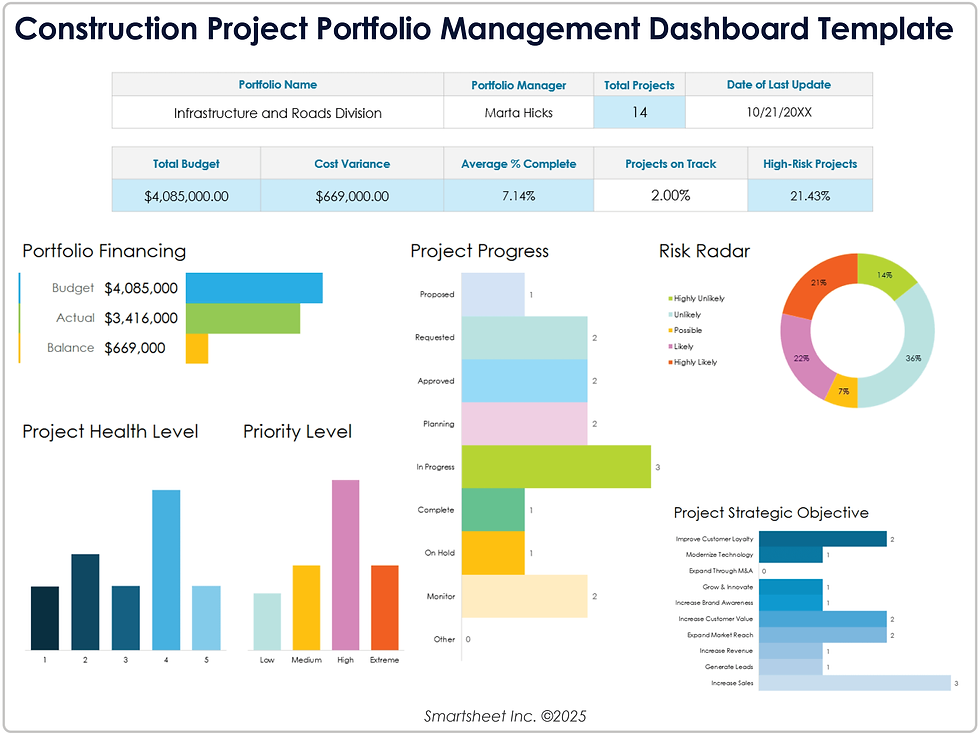
Simple Excel charts and progress trackers provide clear visual representation of project performance, which is highly valued in professional environments.
Cost Control and Budget Monitoring
Cost overruns are a major concern in construction projects. Excel helps engineers compare planned costs with actual expenses, track material usage, and control wastage. Budget sheets prepared in Excel allow quick financial analysis without complex software.
Even senior project managers use Excel dashboards to monitor project cost trends and make strategic decisions.
Data Analysis and Engineering Decision-Making
Excel is not just for data entry it is a decision-support tool. Engineers analyze material consumption rates, productivity trends, and delay patterns using formulas and basic analytics. Functions like SUM, AVERAGE, IF, and VLOOKUP help in organizing and interpreting technical data.
These analytical capabilities improve decision-making speed and accuracy on site.
Role of Excel in Design and Consultancy Work
Even design engineers use Excel extensively for load calculations, design checks, and data validation. Many structural calculations are initially performed in Excel before being modeled in advanced software. It acts as a quick verification tool for engineers.
Consultants also use Excel for BOQ preparation, tender analysis, and cost estimation, making it a universal tool across departments.
Why Fresh Civil Engineers Ignore Excel
Many students consider Excel a “basic” skill and focus only on high-end software. As a result, they enter jobs without knowing formulas, formatting, or spreadsheet organization. This creates difficulties in reporting, estimation, and documentation tasks.
Employers often expect freshers to handle Excel tasks independently from the first day, making this gap highly noticeable.
Key Excel Skills Every Civil Engineer Should Learn
Civil engineers should focus on:
Basic formulas (SUM, IF, COUNT, AVERAGE)
Quantity calculation templates
Data sorting and filtering
Chart creation for progress tracking
Conditional formatting for analysis
Basic dashboards for reporting
These skills significantly improve professional efficiency and technical credibility.
Excel vs Specialized Software: The Practical Reality
While design software is specialized and role-specific, Excel is universal. A site engineer, design engineer, planning engineer, and project manager all use Excel regularly. It integrates easily with reports, presentations, and documentation systems, making it indispensable.
In many companies, Excel proficiency is considered a core competency rather than an optional skill.
Career Advantages of Strong Excel Skills
Engineers with strong Excel skills:
Complete tasks faster
Reduce calculation errors
Prepare professional reports
Support planning and billing teams
Gain managerial responsibilities earlier
This makes them more valuable in both site and office roles.
Conclusion
Excel is one of the most underrated yet essential skills in civil engineering. From quantity estimation and billing to planning, cost control, and data analysis, its applications are vast and continuous. While advanced software tools are important, Excel remains the most practical and frequently used tool in real projects. Civil engineering students and freshers who master Excel early not only improve their technical efficiency but also enhance their employability and career growth. In the real engineering world, the simplest tools often create the strongest professionals.


Comments